
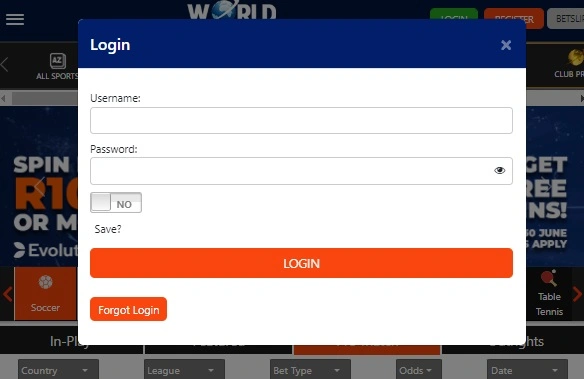
WSB Desktop Login: How to Sign In to World Sports Betting on PC
Last updated: August 8, 2026
Quick answer: To log in to World Sports Betting on desktop, go to worldsportsbetting.co.za, click the green “Login” button at the top of the homepage, enter your username (or registered mobile number) and password, then click the blue “Login” button to confirm. If you can’t remember your details, use “Forgot Login?” on the same page to reset them.
WSB is licensed by the Western Cape Gambling and Racing Board. You must be 18 or older to hold an account. For help with gambling-related concerns, contact the National Responsible Gambling Programme on 0800 006 008.
Step-by-Step: WSB Desktop Login
- Open worldsportsbetting.co.za in your browser — type the address directly rather than clicking a link from an email, SMS, or ad, to avoid landing on a phishing copy of the site.
- Click the green “Login” button, located at the top of the homepage (top-middle on most layouts).
- Enter your username or registered mobile number, along with your password, in the fields provided.
- Optional: tick “Save” if you want your browser to remember your login on that device — only do this on a private computer, not a shared or public one.
- Click the blue “Login” button to complete sign-in and access your account.
Once logged in on desktop, you get the full WSB experience: account balance, betting history, live betting markets, deposits and withdrawals, and live sports streaming — desktop’s larger screen is generally the better option specifically for live-stream viewing and detailed market browsing compared to mobile.
Desktop vs Mobile: What’s the Difference?
Your WSB login credentials work the same way across desktop, mobile browser, and the WSB mobile app — there’s no separate account for each. The practical differences are:
- Desktop: wider screen, better for live streaming and browsing detailed markets, but you’ll typically need to re-enter your password each session unless you’ve saved it in-browser.
- Mobile app/browser: more convenient for logging in on the go, and the app can save your login details for faster repeat access.
Neither platform is more “official” than the other — pick based on what you’re doing at the time.
Why Can’t I Log In? Common Fixes
Forgotten username or password Click “Forgot Login?” (sometimes labelled “Forgot Password”) on the login page. You’ll receive reset instructions via your registered email or phone number — follow them to set new credentials.
Login rejected / incorrect details Double-check you’re entering the exact username or mobile number you registered with — WSB accounts can be tied to either, and mixing them up is a common cause of failed logins.
Account restrictions If you can log in but certain features (withdrawals, higher limits) are locked, an incomplete FICA identity verification is the most likely cause — check your account’s verification status.
Site not loading properly Clear your browser cache or try again in a private/incognito window before assuming there’s an account problem.
Still stuck? Contact WSB support directly via live chat, WhatsApp, or phone through the official site — not through a third-party “support” number found elsewhere online.
A Quick Safety Note
“WSB login” is a heavily searched term, and that makes it a target for phishing pages designed to look like the real thing. A few basics:
- Only enter your WSB credentials on worldsportsbetting.co.za directly.
- WSB will never ask for your full password by email, SMS, or phone call.
- If you’re downloading the app, get it from WSB’s own official site rather than a third-party app store listing or a link shared on social media.
Quick FAQ
How do I log in to WSB on desktop? Go to worldsportsbetting.co.za, click the green “Login” button, enter your username/mobile number and password, then click the blue “Login” button to confirm.
Is my WSB login the same on desktop and mobile? Yes, your credentials are universal across desktop, mobile browser, and the WSB app — there’s no separate account per platform.
What do I do if I forget my WSB password? Click “Forgot Login?” on the login page and follow the reset instructions sent to your registered email or phone number.
Why can’t I withdraw even though I’m logged in? This is usually due to incomplete FICA identity verification, which WSB requires before unlocking full account features, in line with South African gambling regulations.
Is WSB a licensed betting site? Yes, WSB is licensed and regulated by the Western Cape Gambling and Racing Board.
Should I save my WSB login on my computer? Only if it’s a private device you control — avoid saving login details on shared or public computers.