
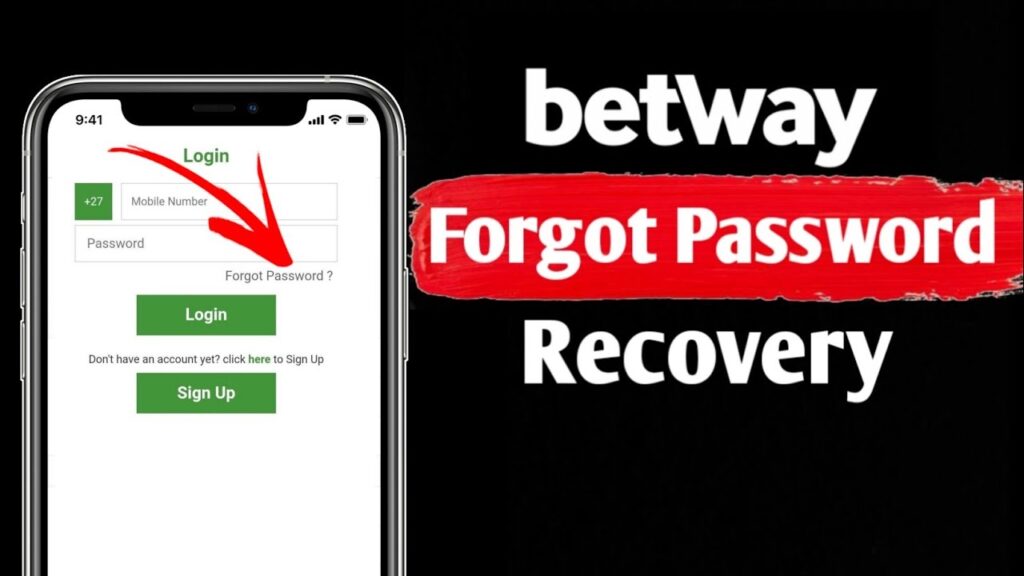
How to Reset Your Betway Password: A Step-by-Step Guide
How to Reset Your Betway Password
Forgetting your password can be frustrating, especially when you’re ready to place a bet. Fortunately, Betway provides three simple methods to reset your password and regain access to your account.
Whether you prefer using the website, the mobile app, or even SMS, this guide covers everything you need to know to reset your Betway password securely and quickly.
Why You Might Need to Reset Your Betway Password
There are several common reasons why users need to perform a password reset:
- Forgotten credentials: You simply can’t remember your login details.
- Security concerns: You suspect unauthorized access and want to secure your account.
- Account lockout: You’ve entered the wrong password too many times.
- Technical issues: The system prompted a reset due to inactivity or security updates.
Regardless of the reason, Betway makes the process straightforward.
Prerequisites Before You Start
Before initiating a password reset, ensure you have the following:
- Registered mobile number: This is essential, as Betway uses your phone number as your username.
- Access to your email or SMS: You will receive a verification code via your chosen method.
- A stable internet connection: For website or app resets.
Method 1: Reset via the Betway Website or App
This is the fastest and most common method.
Step 1: Navigate to the Login Page
- Open the Betway South Africa website or launch the Betway mobile app.
- Tap or click the Login button.
Step 2: Click “Forgot Password?”
- Below the password field, locate and select the “Forgot Password?” link.
Step 3: Enter Your Registered Details
- Input your registered mobile number (this is your username) or your email address.
- Click Submit.
Step 4: Choose Your Verification Method
- Select whether you want to receive the reset code via SMS or Email.
Step 5: Enter the Verification Code
- Check your messages or inbox for a 4-6 digit code.
- Enter the code in the required field.
Step 6: Create a New Password
- Choose a strong, unique password.
- Confirm the password and submit. You can now log in with your new credentials.
Method 2: Reset via SMS (No Internet Required)
If you’re offline or prefer a simpler method, Betway allows password resets via text message.
Step 1: Open Your Messaging App
- Go to your phone’s SMS or text message app.
Step 2: Send a Reset Request
- Compose a new message and type the word RESET.
- Send it to 6446.
Step 3: Receive Your Temporary Password
- You will receive a reply SMS containing a temporary password.
Step 4: Log In and Update Your Password
- Use the temporary password to log in to your Betway account.
- Immediately navigate to My Account > Change Password and set a permanent password.
Method 3: Reset via Email (Alternative)
If you have trouble with SMS delivery, you can request a reset link via email.
- Follow the same steps as Method 1, but choose Email as your verification method.
- Check your inbox (and spam folder) for a password reset link from Betway.
- Click the link and follow the prompts to create a new password.
Tips for Creating a Strong Password
To keep your Betway account secure, follow these password best practices:
| Do | Don’t |
|---|---|
| Use a mix of uppercase and lowercase letters | Use easily guessable info like your name or birthdate |
| Include numbers and special characters (@, #, $, etc.) | Reuse passwords from other websites or apps |
| Make it at least 8-12 characters long | Share your password with anyone |
| Change it periodically for security | Write it down in an unsecured location |
Troubleshooting Common Issues
I Didn’t Receive the Reset Code
- Check signal: Ensure you have a stable mobile network connection.
- Check spam: If using email, look in your junk or spam folder.
- Wait a few minutes: Sometimes delivery can take up to 5 minutes.
- Verify your number: Make sure you’re using the exact number you registered with.
I No Longer Have Access to My Registered Number
- If your registered mobile number is no longer active, you will need to contact Betway Support directly to verify your identity and update your details.
My Account Is Locked
- After multiple failed login attempts, your account may be temporarily locked. Use the password reset process to unlock it. If the issue persists, contact customer support.
Frequently Asked Questions (FAQs)
Is it free to reset my Betway password?
Yes, both the website/app reset and the SMS reset are free of charge. Standard SMS rates may apply depending on your mobile provider.
How long does it take to reset my password?
The process takes less than 5 minutes, provided you have access to your registered mobile number or email.
Can I reset my password without my mobile number?
No. Betway uses your registered mobile number as the primary identifier for security. If you’ve lost access, you must contact customer support.
What should I do if the reset link doesn’t work?
Ensure you click the link within the validity period (usually 15–30 minutes). If it expires, request a new reset code.
Need Further Assistance?
If you’ve tried the steps above and still cannot access your account, Betway’s customer support team is available to help.
- Live Chat: Available 24/7 via the Betway website or app.
- Email: Send your query to the official Betway support address.
- Phone: Call the support line listed on the official Betway website.
Disclaimer: This guide is for informational purposes only. Always refer to the official Betway website for the most current procedures and terms. Gambling involves risk. Please play responsibly.